Building X-Dispatch
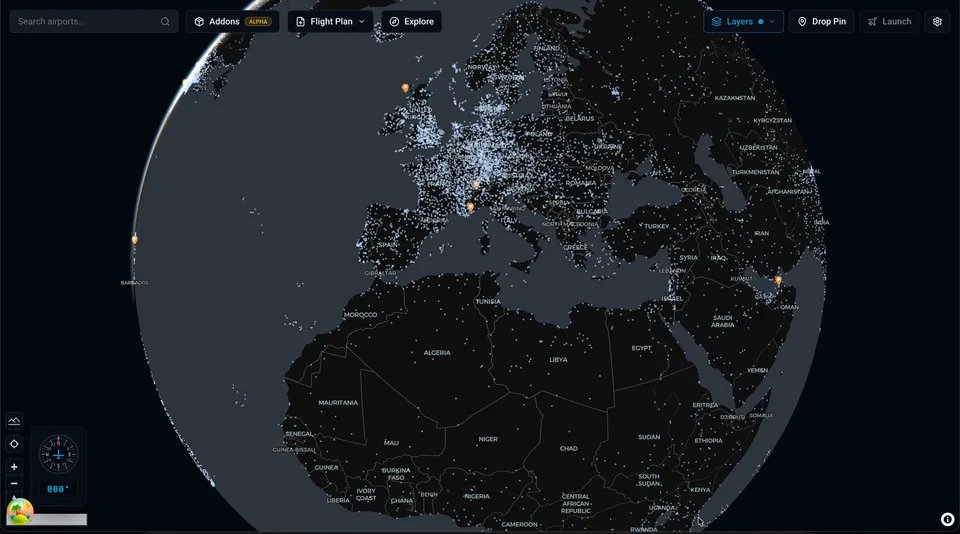
In September 2021, Laminar Research had just announced X-Plane 12. I asked them if they’d consider adding a global map to the main menu.
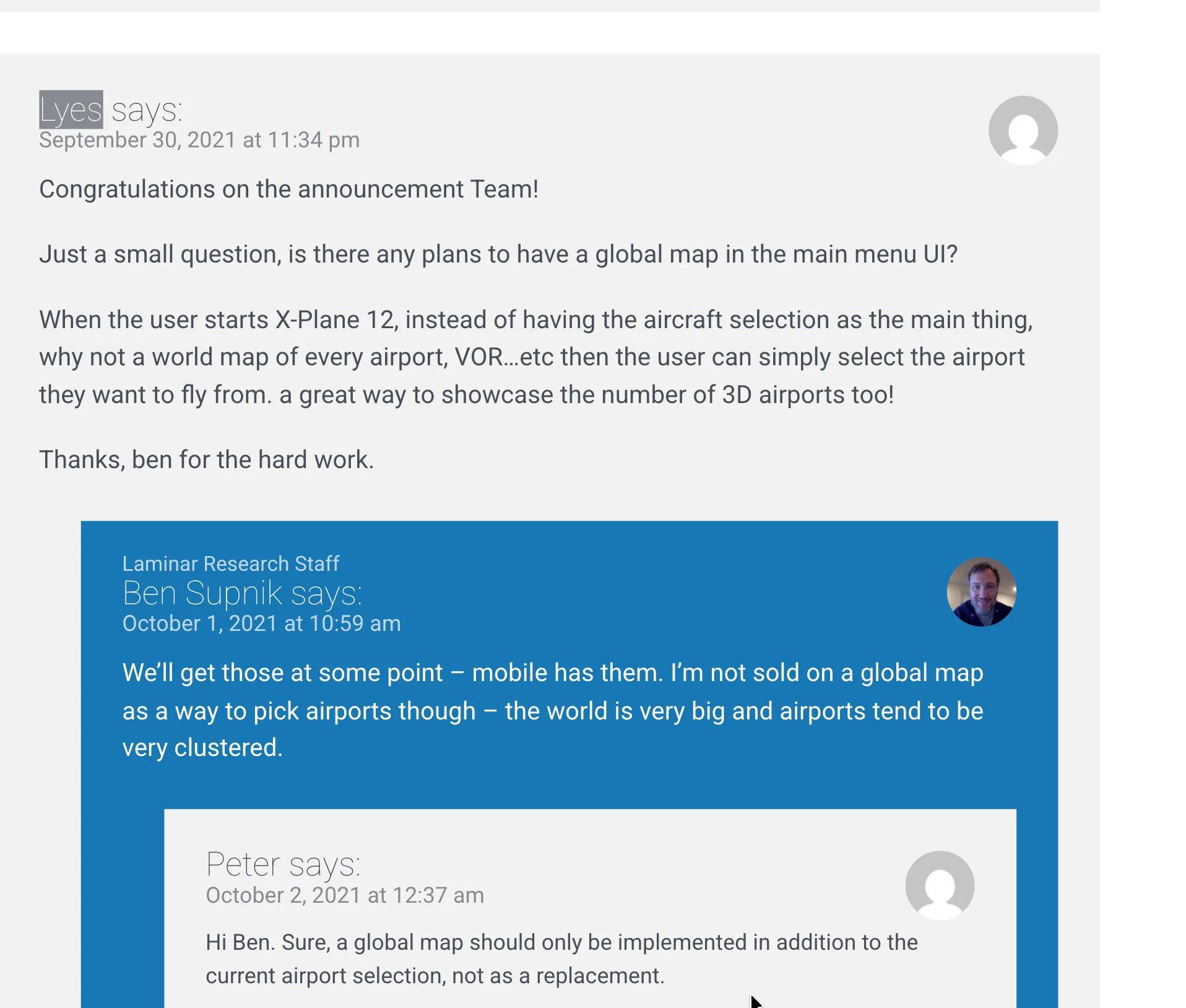
Fair enough. I moved on. Except I didn’t. The idea kept scratching at the back of my head. I’d be doing something completely unrelated and catch myself thinking about how a global airport map would work. What it would look like. How you’d render 35,000 airports without the whole thing melting.
Two things had to work
I like to tackle the hard stuff first. If the hard stuff can’t be solved, everything else is wasted effort.
Here, there were two hard things. First, parsing apt.dat. X-Plane stores all airport data in this one massive text file. Not the 3D models, but the layout: runways, taxiways, pavement, gates, markings. It’s a text file, so parsing it should be easy, right? Reading metadata was fine. Straight line polygons, fine. But the curves… oh boy.
Second, getting X-Plane to actually start with the user’s choices. I knew the sim kept its last flight configuration in a text file called Freeflight.prf. My thinking was: modify that file before launch, and X-Plane reads it and sets everything up. But there were zero docs about how this worked.
The first attempt
I tried building it in Flutter because that’s what I was comfortable with. My approach back then was different from what X-Dispatch ended up being. I wanted to show the airports on a map, sure, but the actual airport detail view would be a separate canvas where I’d draw the layout myself, converting the coordinates to X,Y screen positions. On top of that, rendering each airport’s data points on the Flutter map was painfully slow. There was clustering, but it felt like I was fighting the framework the whole time. It defeated the vision I had for the app. I parked it.
But I kept thinking about it.
Bezier curves nearly killed this project
The apt.dat spec was confusing to me. Not the metadata part, that was straightforward. The geometry part. X-Plane encodes airport shapes using curves. Every smooth edge you see at an airport, every taxiway bend, every rounded pavement corner, is defined by these curves in the file. The format stores control points that tell the renderer which direction a curve should go, but the way they’re encoded is not intuitive at all.
The resources were there. The apt.dat spec is public, and there are X-Plane forum threads where people explain the geometry. I read all of it. It still didn’t click. I’m a visual person. Reading someone’s text explanation of how a control point defines a curve direction doesn’t work for me. I need to see the curve, see the points, see what happens when I move one.
I got it to a point where shapes looked… reasonable. Not right, but close enough that you could tell what they were supposed to be. Curves bending the wrong direction. Spikes appearing at corners. Holes in pavements not cutting through properly.
I managed to parse shapes to a recognizable level, but it was not what I wanted and not what I’d ship to real users.
My mistake, looking back: I spent way too long converting latitude/longitude to screen X,Y coordinates by hand, doing projection math myself. That drained all my energy on the wrong problem. Because I couldn’t get the first problem right, I shelved the whole project. WIP for a few years.
Still in the back of my head. Always scratching.
Coming back to it
I got a job, got more engineering experience, built other things. Decided to pick this up again, but differently.
The stack I landed on
MapLibre GL JS ticked every box: polygons, GeoJSON shapes, extensible, stable, and it handles coordinate projections for me. That last part was the big one. All the projection math I was doing by hand before? MapLibre just does it. I could even add 3D terrain if I wanted. Basically I could do anything, limited only by the user’s machine.
But MapLibre is a web thing, and this needed to be a desktop app. Two options: Electron or Tauri. Tauri is actually the better fit on paper. Less memory, lighter, more modern. But it’s built on Rust. I know nothing about Rust. The last thing I wanted while building something this complex was to also be learning a new language. Even with Claude and other AI tools helping, I didn’t want code in my app that I couldn’t reason about when something breaks. So Electron it was. My users run flight simulators, they have plenty of RAM, the overhead wasn’t going to matter.
Parsing apt.dat, second attempt
This time I went straight for the bezier rendering. Heart of the app. If this doesn’t work, nothing else matters.
The thing that actually made it click: I opened WED, which is X-Plane’s airport editor tool, and started drawing shapes. Then I’d look at the apt.dat file WED produced and compare. Drawing a shape visually and then reading the output it generated made the control point mirroring logic obvious in a way that reading the spec alone never did. It was a lot of back and forth with Claude and various documentation sources I found online, but WED was the breakthrough.
I wrote the full technical breakdown. Then I tackled linear features, the painted lines and taxiway lights.
This is what the final airport rendering looks like. Taxiways, pavement, painted lines, edge lights, gates, runways. All parsed from that one text file.
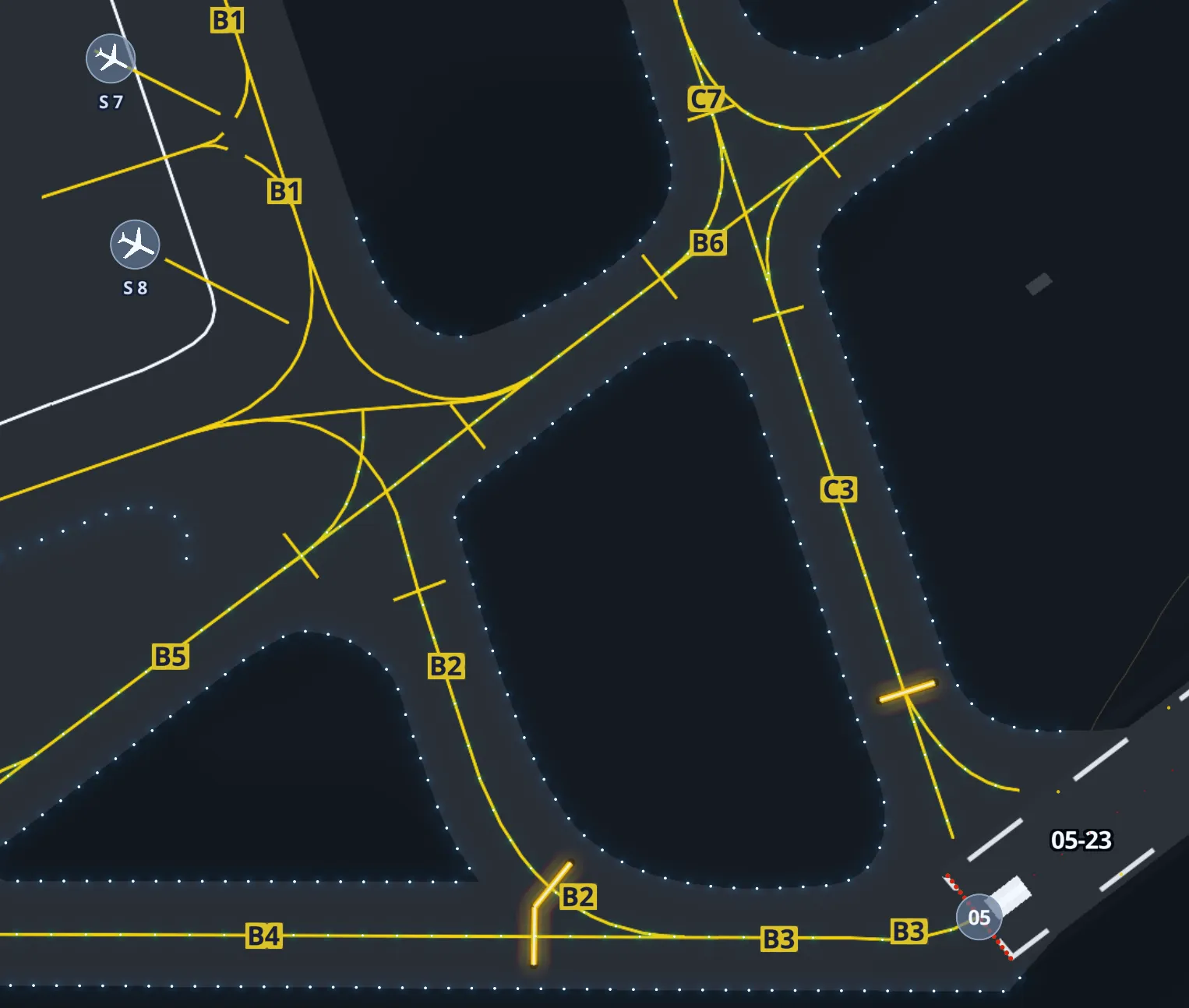
One cool thing about X-Plane: they open sourced their airport data through the Scenery Gateway. People design airports, upload them, and if approved, they appear in the next sim update. In the sim itself, all these airports live in one file. I had to parse that global file, extract each airport individually, and save them to a local SQLite database. I stored just the airport code, some metadata, and the raw apt.dat text for that airport in one field. When someone clicks on an airport, I parse and render from that field, on demand. Trying to pre-calculate all polygons for every airport at startup would take forever.
If a user has custom scenery installed for an airport, that gets priority over the default.
OK I have airports. Now what?
I got to the point where I could render gates and runways, and the user could pick a starting position. Looked good. But then I sat there thinking, right, they picked a gate… now what? How does X-Plane actually know about this?
Remember Freeflight.prf? This is what’s in it:
_airport LFBO
_last_start {"ramp_start":{"airport_id":"LESL","ramp":"Parking 1"}}
_aircraft Aircraft/Laminar Research/Van's Aircraft RV-10/RV-10.acf
_wxr_def ,var_rand_space_pct=0.00,...
Airport, gate, aircraft, weather, time of day. A lot of data. I’d been keeping an eye on this file because I knew about it from poking around X-Plane’s output folder. My idea: rewrite these values and launch X-Plane with a flag to skip the main menu. X-Plane’s default behavior is to read this file and set up the flight from it.
There are zero docs about this. I’m sure the X-Plane developers never wanted third parties touching it. But at the time, it was the only option. There were a lot of catches and edge cases, and I managed to make it work, but people started reporting issues. Some I fixed. Some were just inherent to hacking an undocumented file.
Here’s the thing though: when X-Plane is already running, I just use the REST API. That arrived in 12.4, beautifully documented, and had everything I needed. Relocating someone mid flight was a breeze.
But the cold start problem was still there. Command line flags I knew about didn’t help. Then I found something. An undocumented command line argument that accepts the same JSON as the REST API. Not written about anywhere. It just works.
This solved everything. X-Dispatch can launch X-Plane from scratch with a fully configured flight, or relocate mid flight if the sim is already open.
If Laminar changes or removes that flag, my app breaks. I’m hoping they won’t. Honestly, the fact that it exists at all makes me think they might be working on their own external launcher at some point.
Design
I wanted X-Dispatch to feel like it belongs in X-Plane, not like some random third party tool bolted on from the outside.
Blind Pig Design wrote about the X-Plane 11 UI redesign and the thinking behind it stuck with me. Their whole approach was: make everything visual. They replaced long text lists of airports and aircraft with tiles, maps, wizard flows. If you wanted to pick a starting position, you used to scroll through a text list of ramp names. In version 11 you click on a map. Weather went from typing cloud layer heights to dragging sliders with visual previews. They started with typography and built a component library that everything else came from.
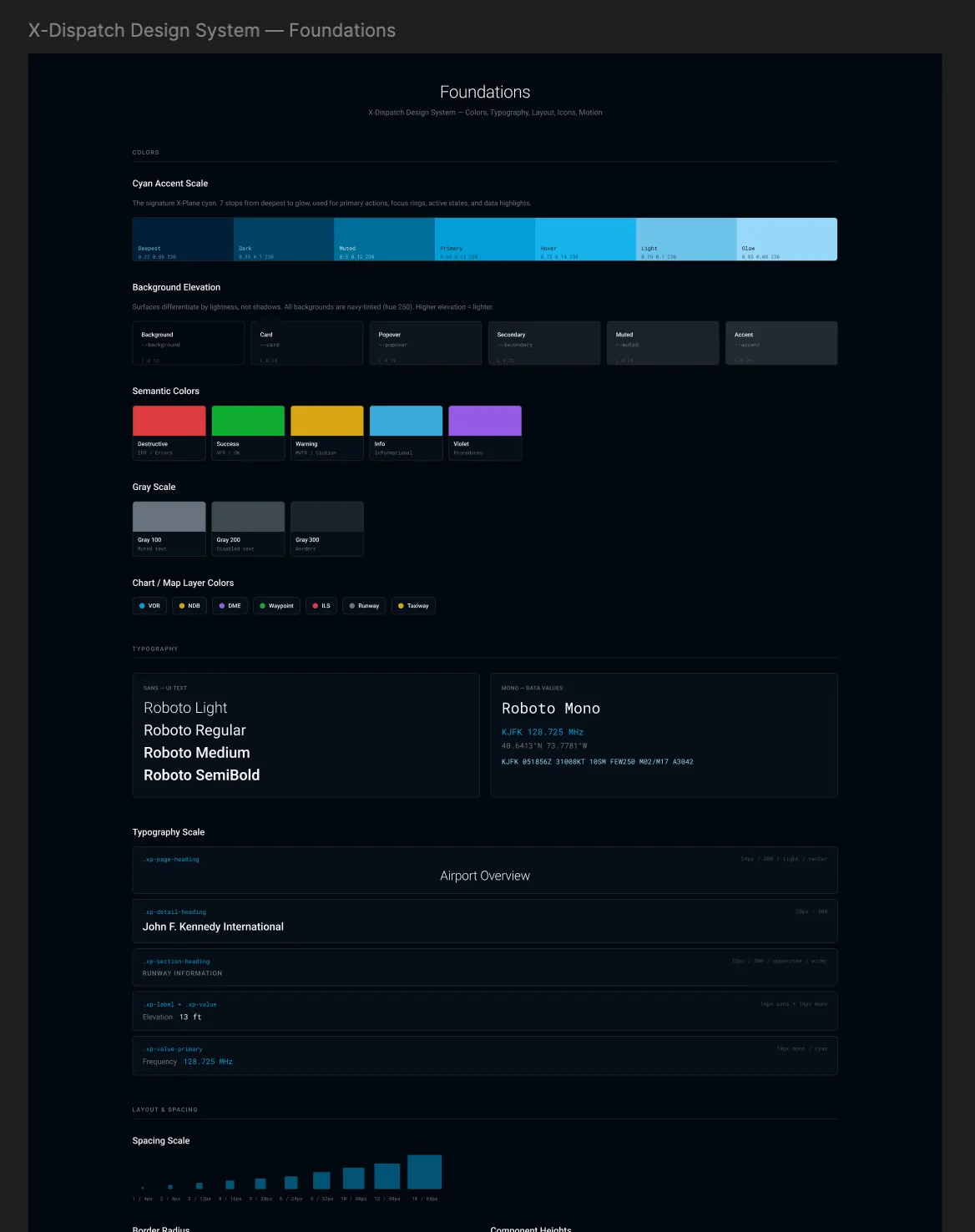
I took the same idea. Started with a dark colour palette using X-Plane’s signature cyan as the accent. Built a component library with colour tokens, typography scales, spacing rules, and semantic colours for things like flight categories and map layers. Everything in the app pulls from the same set of tokens.
After launch
Most of the features that came after were from users. One person in particular gave me probably the best bug reports I’ve ever received. Detailed reproduction steps, screenshots, everything tracked in a Google Sheet. A lot of the features he proposed made the app noticeably better, and some of the bugs he caught would have been deal breakers if they’d gone out. I can’t thank him enough.
FSElite covered the app. 19 reviews on X-Plane.Org, all five stars. Someone wrote that Laminar should recruit me.
I don’t know about that. I just wanted a map.