Building Dinar Échange
An app for tracking Algerian dinar exchange rates. The hard part wasn't the app, it was finding the data.
A friend wanted an easy way to check Algerian dinar exchange rates. Not the official bank rate that the government publishes. The real one. The parallel market rate that everyone actually uses.
If you’re not familiar with Algeria, there’s a big gap between the official exchange rate and what you’d actually get if you exchanged money on the street. Everyone knows this. Nobody talks about it officially. And there’s no API for it.
I figured I’d build an app. Partly because my friend needed it, partly because I wanted to learn what it takes to ship a mobile app end to end, from writing code to having something real on the Play Store.
The actual hard part
The app itself wasn’t complicated. The hard part was getting the data.
There’s no API for the parallel market. The rates live on informal websites, Facebook groups, word of mouth. Different sources post different numbers. They update at different times. Some are more trusted than others. And none of them structure their data the same way.
My approach: don’t trust any single source. Scrape several, and go with the freshest one.
How the backend works
Every day at 8am Algiers time, an EventBridge rule triggers a main Lambda function. That function doesn’t scrape anything itself. It invokes a list of other Lambda functions, one per source. Each scraper is its own Lambda, its own deployment, its own code. But they all have the same contract: go scrape your source, return the data in this exact shape:
{
  "update_time": "30-03-2026",
  "currencies": [
    { "currencyCode": "EUR", "buy": 253.0, "sell": 255.0 },
    { "currencyCode": "USD", "buy": 232.0, "sell": 235.0 }
  ]
}
The controller tries each scraper in order. First one that returns valid data wins. If a scraper fails because the website changed its HTML or went down, the next one picks up.
def fetch_currencies(self) -> List[Currency]:
    for function_name in self.scrapers:
        try:
            json_content = self.invoke_lambda(function_name)
            currency_data = self.parse_data(json_content)
            if currency_data:
                return currency_data
        except (DataFetchError, DataParseError) as e:
            logger.error(f"Failed with {function_name}: {e}")
    raise Exception("All scrapers failed to fetch data.")
Simple fallback chain. No complicated orchestration.
Core currencies vs everything else
The scrapers only get rates for the major currencies people actually trade on the parallel market: EUR, USD, GBP, CAD, a handful of others. These are the “core” currencies.
But people want to see rates for all kinds of currencies. So after scraping, I take the USD parallel rate and cross-reference it against a free exchange rate API to calculate approximate rates for every other currency in the world. If the parallel market says 1 USD = 232 DZD, and the API says 1 USD = 0.92 EUR, I can derive what 1 JPY or 1 BRL is worth in dinars on the parallel market.
Is it perfect? No. Sources disagree sometimes. The margin is about ±3 dinars. But the parallel market itself doesn’t have precision. Someone in Algiers will give you a different rate than someone in Oran. For someone checking whether to exchange money today or wait, ±3 is more than good enough.
Storing the data
Everything goes to Firebase Firestore. Each day’s rates get stored as a document keyed by date. I also keep trend data going back two years so the app can show rate history. The trend collection stores one document per currency code with date-to-rate mappings, and I trim anything older than 730 days on each update.
The Currency model looks up a countries.json file to fill in the name, symbol, and flag for each currency code. Scrapers don’t need to care about display stuff, they just return codes and numbers.
The app
The UX was what I cared about most. Exchange rate apps tend to look like financial terminals. Numbers everywhere, charts, abbreviations. My friend doesn’t have a finance background. Most people checking the dinar rate don’t either. They just want to know: if I have 100 euros, how many dinars do I get today?
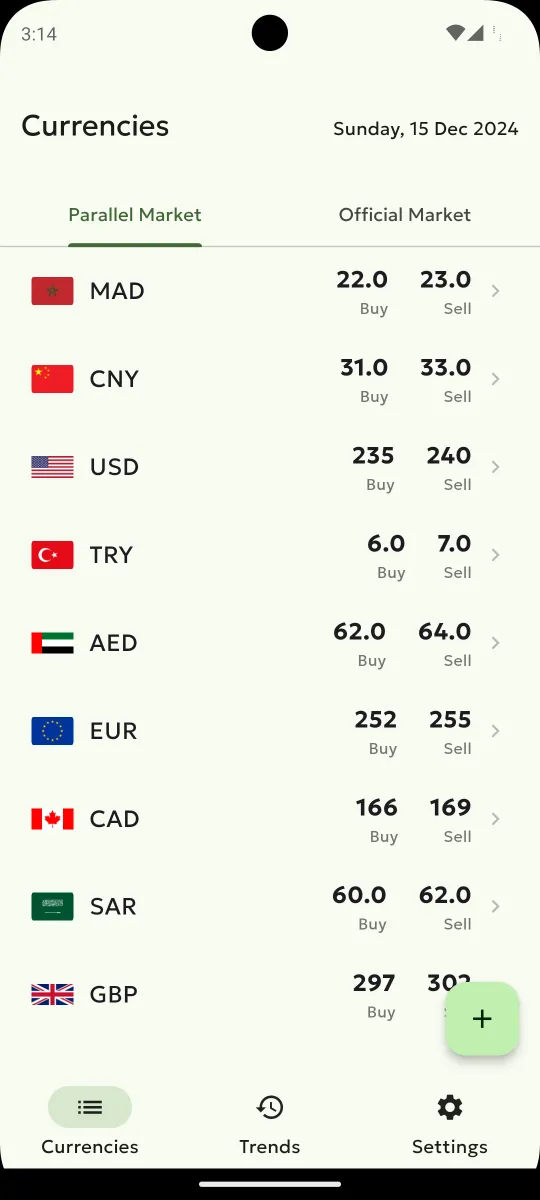
Two tabs at the top: parallel market and official market. Pick a currency, see buy and sell. Add the ones you care about to your list, drag to reorder.
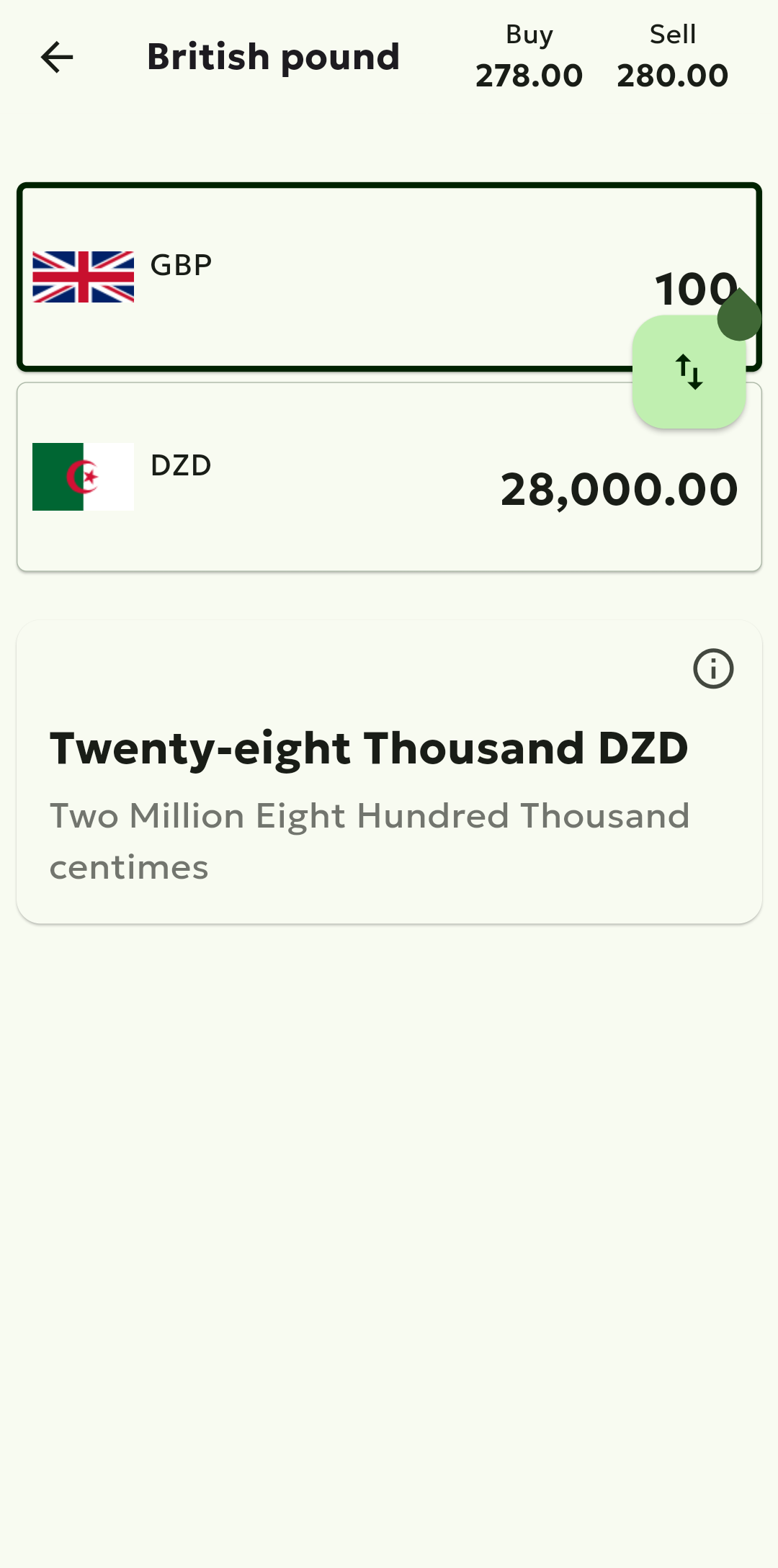
Tap any currency to open the converter. Buy and sell rates always confused me. Which one do you use? Instead of making people figure that out, I made the design handle it. Inspired by Wise: the currency on top is always the one you have, and it’s the only field you can type in. Put euros on top, type 200, and you see dinars below using the sell rate. Swap them so dinars are on top, type how many dinars you have, and it switches to the buy rate. You never pick a rate. The app just knows based on which direction you’re converting. The amount is spelled out in words underneath so you’re never squinting at zeros wondering if that’s twenty-eight thousand or two hundred eighty thousand. Getting number-to-words right in three languages was its own adventure. Arabic number naming in particular has rules that took a while to get right.
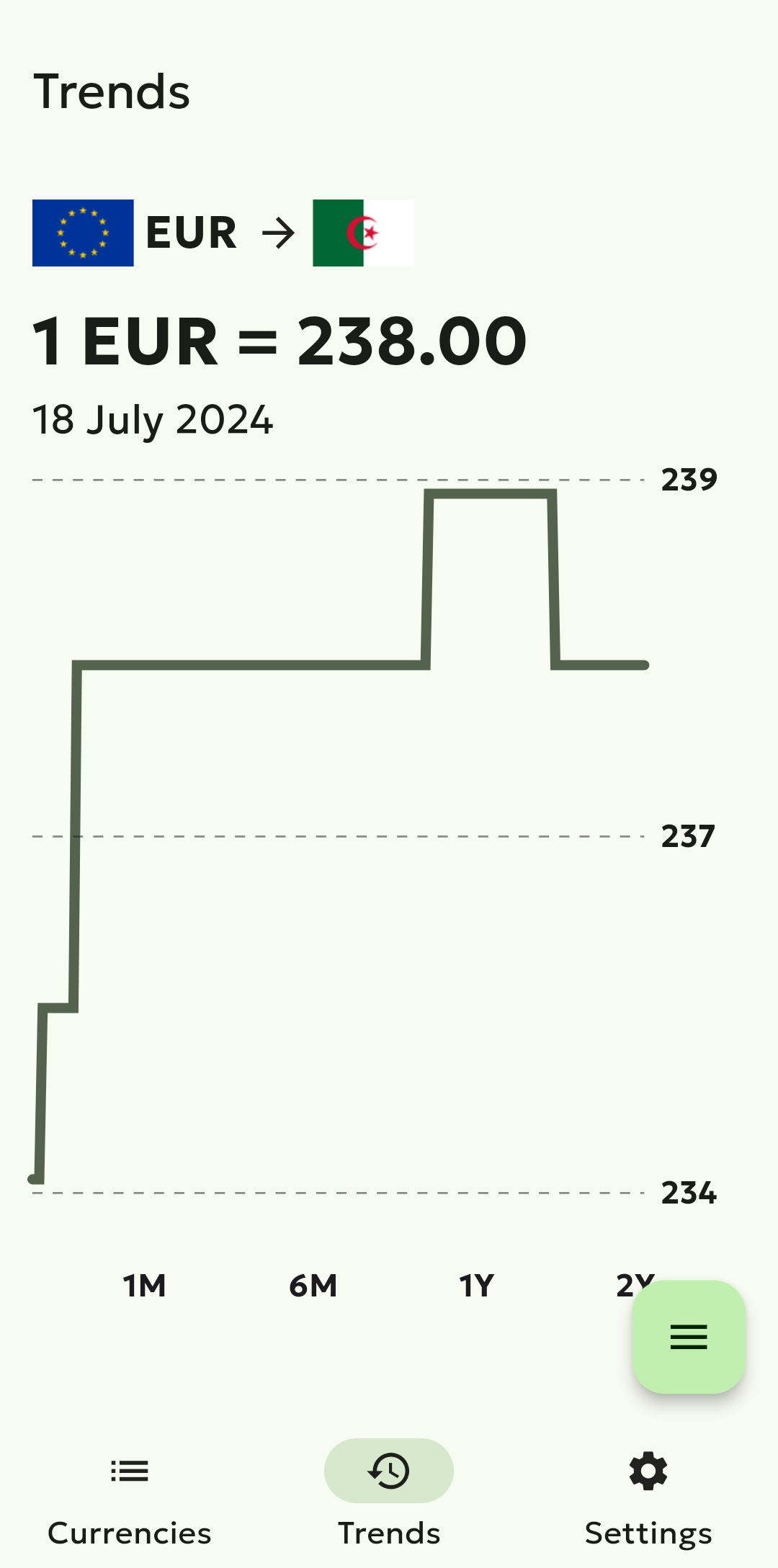
The bottom nav has three sections: Currencies, Trends, and Settings. I built the trends chart from scratch instead of using a charting library. It colors the line green or red depending on whether the rate is going up or down, and you can tap any point to see the exact value on that date. Three languages: English, Arabic, French. That’s it.
The official bank rate is generated by taking the official DZD rate from a public API and applying a 2% buy/sell spread, which is roughly what banks charge. Having both rates side by side lets people see the gap between what the government says and what the street says.
Things I had to think about
Internet in Algeria isn’t always reliable. The app caches everything locally and can survive up to 7 days without a connection. It walks back through cached data until it finds something, and only throws an error if you haven’t opened the app in over a week. Nobody should see an empty screen because their connection dropped.
The cache is also timezone-aware. New rates come in at 8am Algiers time, so before 9am yesterday’s data is still fresh. After 9am it refreshes. A simple timer-based expiry wouldn’t work here because the data itself updates on a schedule tied to Algeria’s timezone.
There’s no user account. The app uses Firebase anonymous auth behind the scenes, just enough to authenticate Firestore access through App Check. The user opens the app and sees rates. No sign up, no login, no friction.
Push notifications are language-aware. When you change your language in settings, the app unsubscribes from all notification topics and resubscribes to just your language. So the “today’s rates are available” notification comes in French if you’re using French, Arabic if Arabic.
I also use Firebase Remote Config to control how often ads appear. Instead of hardcoding “show an ad every 3 taps”, the probability is a number between 0 and 100 that I can change server-side without pushing an update. This way I could tune it after launch based on how annoying it felt.
The app also ships with six theme variants: light, dark, and medium/high contrast versions of each. Probably overkill for this kind of app, but accessibility matters and it was easy to set up with Material 3.
One thing I’m happy with is the startup. The app loads currency data first, drops the splash screen as soon as rates are ready, then initializes ads, analytics, and push notifications in the background. You see data fast. The other stuff can wait.
Scrapers break
Websites change their layout, move elements around, go down for maintenance. I’ve rewritten individual scrapers multiple times. Each one uses BeautifulSoup to parse HTML, and each one breaks in its own way.
Having multiple sources means the app still works while I fix the broken one. The contract between scrapers and the main Lambda never changes, so the app doesn’t know or care which source provided today’s rate.
20 releases later
Getting on the Play Store is a process. Privacy policy, data safety forms, screenshots in specific dimensions, content rating questionnaire. The review took a few days with no visibility into what they were checking.
Version 1.4.8 now, 20 releases in. Most updates are scraper fixes (some website changed their HTML again) or small UX improvements people asked for. It works. People use it. That’s enough.